Best Robot Vacuums for Homeowners (2026 Guide)
The best robot vacuums tested across hardwood, carpet, and pet hair. Top picks by budget, self-empty models, and which features are worth paying extra for.
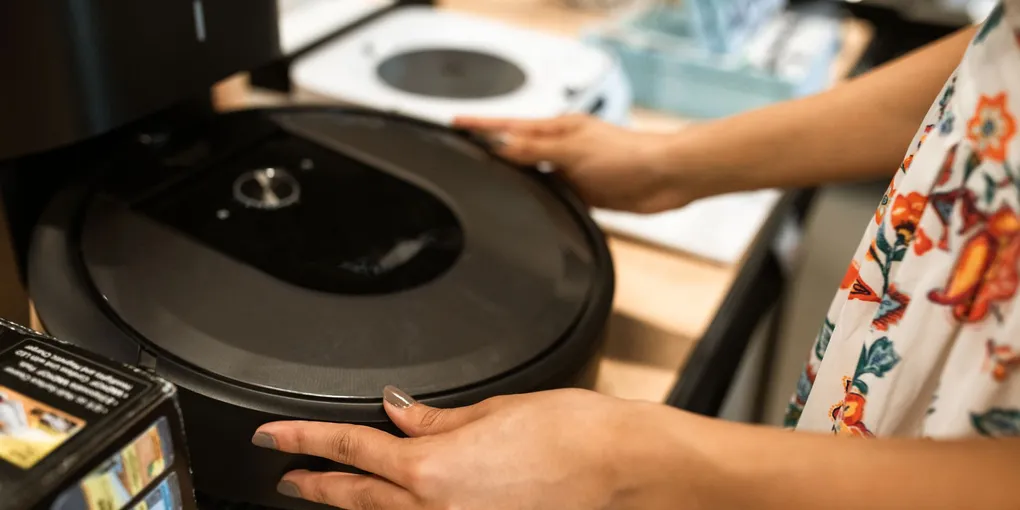
The best overall robot vacuum in 2026 is the Roborock Q Revo — mops and vacuums, auto-empty and auto-refill base, $600-$800. For a budget pick under $300, the Eufy X10 Pro Omni with suction up to 8,000 Pa handles most carpet and pet hair well. Skip low-end bots under $150 — they bump into obstacles, miss coverage, and need constant emptying. A quality robot vacuum runs unattended 4-6x per week and genuinely reduces manual vacuuming time for homeowners.
Frequently Asked Questions
Are robot vacuums actually worth it?
Yes for most homeowners with hard floors or low-pile carpet. A mid-range robot runs 4-6x per week, maintaining baseline cleanliness between deep cleans. The time savings typically repay the $400-$800 purchase within a year. Households with multiple pets or kids see the largest benefit.
Robot vacuum vs. stick vacuum: which should I buy?
Buy both if possible. A robot vacuum maintains daily cleanliness; a stick or upright handles deep cleaning, stairs, and furniture. Many homeowners cut their deep-cleaning frequency by 50% after adding a robot, but don't skip the manual vacuum entirely.
Do I need a self-empty base?
Worth it if your floor plan is large (over 1,500 sq ft), you have pets, or you don't want to empty the bin every 1-2 runs. Self-empty bases hold 30-60 days of debris. The $150-$300 premium is worth it for most homeowners who would use the vacuum daily.
Will a robot vacuum work on thick carpet?
High-end units with 6,000+ Pa suction handle medium-pile carpet (most residential bedroom carpet). Thick, plush carpet over 1 inch pile height can stall even premium models. Check the specs carefully and read owner reviews for your carpet type before buying.
What's the difference between LIDAR and camera navigation?
LIDAR (laser) is the current gold standard — maps rooms accurately in any lighting, navigates efficiently, creates no-go zones. Camera-based navigation works in good light but struggles in dim rooms. Always choose LIDAR for under-$1,000 purchases — it's now the standard.
How often do I need to replace parts?
Expect to replace filters every 2-3 months ($15-$30), side brushes every 6 months ($15-$25), main brushes every 12 months ($20-$50), and batteries every 2-4 years ($50-$150). Total parts cost typically runs $50-$120/year for most models.
Roomba vs Roborock vs Ecovacs — which robot vacuum brand is best in 2026?
Brand comparison for 2026: Roborock (S8 Pro Ultra, $900–$1,400): best overall in 2026. Combines strong suction (6,000 Pa), accurate LIDAR mapping, mop functionality with auto-lift on carpets, and self-empty/self-wash base in one unit. Best performance-per-dollar at the premium tier. Best pick for most homeowners willing to spend $800+. iRobot Roomba (j9+, Combo j9+, $700–$1,100): best app ecosystem and the most established self-empty base (Clean Base). Roomba excels at carpet and pet hair — the rubber dual extractor brushes tangle less than bristle brushes. Now owned by iRobot (acquired by Amazon), which adds Alexa integration depth. Best if you have heavy carpet or lots of pet hair. Ecovacs Deebot (X2 Omni, T30S Pro, $500–$1,000): best budget-to-feature ratio. Recent models match Roborock on suction and add mop + self-empty at a lower price. Build quality is slightly below Roborock but the value gap is significant. Best for cost-conscious buyers who want full features. Shark (Matrix, AI Ultra, $300–$700): best mid-range value. Strong suction, reliable navigation, and good pet hair performance at $300–$500. Less advanced than Roborock/Roomba at the top end but excellent for the price. Summary: Roborock for best performance, Roomba for pet hair and carpet, Ecovacs for value, Shark for mid-range budget.
What is the best robot vacuum for pet hair in 2026?
The best robot vacuums for pet hair in 2026: Best overall for pet hair: iRobot Roomba j9+ ($700–$900) — rubber dual-extractor brush system specifically designed to not tangle with pet hair. The j9+ self-empties into the Clean Base and uses AI to detect pet waste and avoid it (a real problem with robot vacuums). Best value for pet hair: Roborock S8 ($400–$600) — 6,000 Pa suction handles embedded pet hair in carpet well. Rubber brush reduces tangles vs. bristle brushes. Best budget pet hair robot: Shark AV2501WD IQ Robot ($250–$350) — matrix clean pattern ensures full coverage, handles pet hair on hard floors and low-to-medium pile carpet. Key features to look for when you have pets: (1) Rubber or tangle-free brush roll — essential. Bristle brushes collect pet hair and require constant cleaning. (2) High suction (3,000+ Pa) for embedded carpet hair. (3) Self-empty base — pet hair fills the dustbin faster than normal debris; self-empty extends intervals to weekly. (4) Pet waste avoidance — newer premium models (Roomba j9+, Roborock S8 MaxV Ultra) use cameras to detect and avoid accidents. (5) HEPA or equivalent filtration to contain allergens.
The best robot vacuum for most homeowners in 2026 is the Roborock S8 Pro Ultra ($1,000) for all-in-one docking, or the Shark IQ RV1001AE ($280) as the best value pick with self-emptying base. Budget option under $200: Eufy 11S. Key features that matter: self-emptying base (avoids daily emptying), LIDAR mapping (faster, more complete cleaning), and pet hair mode if you have animals. Skip models without auto-empty — you’ll stop using them within a month.
A good robot vacuum is one of the few smart home purchases that genuinely buys back your time. Wrong one, and it bumps into walls, misses rooms, and sits broken under the couch. This guide separates the real performers from the marketing.
Top Picks at a Glance
| Pick | Model | Price | Suction | Self-Empty | Mop | Best For |
|---|---|---|---|---|---|---|
| Best All-in-One | Roborock S8 Pro Ultra | $1,000 | 6,000 Pa | Yes | Yes (self-clean) | Pet hair + hard floors + carpet |
| Best Overall Value | Roborock Q Revo | $700–$800 | 5,500 Pa | Yes | Yes | Best performance per dollar |
| Best Under $400 | Eufy X10 Pro Omni | $400–$500 | 8,000 Pa | Yes | Basic | Budget all-in-one |
| Best Roomba | iRobot Roomba j9+ Combo | $900 | High | Yes | Yes | Smart obstacle avoidance |
| Best Budget | Roborock Q5+ | $300–$400 | 2,700 Pa | Yes | No | Solid vacuuming only, no mopping |
| Cheapest Entry | iRobot Roomba 694 | $170–$200 | Moderate | No | No | Basic auto-vac for renters |
What to Look For
LIDAR Navigation (Non-Negotiable)
Laser-based LIDAR maps your home in a single scan, creates efficient cleaning paths, and remembers the layout between runs. In 2026, LIDAR is standard on anything over $250. Skip anything without it — random-navigation bots miss large areas and take 3x longer.
Suction Power (Measured in Pa)
- < 2,500 Pa: Basic, hard floors only. Skip.
- 2,500-5,000 Pa: Good for hard floors and low-pile carpet.
- 5,000-8,000 Pa: Handles medium-pile carpet and pet hair well.
- 8,000+ Pa: Premium, handles pet households and medium-thick carpet.
Self-Empty Base
A docked base that empties the robot’s bin automatically. Holds 30-60 days of debris in a larger bag. Adds $150-$300 to the price. Worth it if you don’t want to empty after every 1-2 runs.
Mopping Capability
Hybrid vac-and-mop units have two modes: vacuum-only, or vacuum + wet mop. Best for mostly-hard-floor homes. Modern “auto-refill” bases handle dirty water and detergent automatically.
Skip wet mopping if most of your home is carpet — the water handling is an unnecessary complication.
App and Routines
All serious 2026 robot vacs have Wi-Fi apps. Essential features:
- Save maps between runs
- Set no-go zones (e.g., around pet bowls, rug tassels)
- Schedule specific rooms at specific times
- Voice control (Alexa, Google, Siri)
The Best Robot Vacuums in 2026
Best Overall: Roborock Q Revo
Roborock Q Revo Self-Emptying Vac and Mop — $600-$800
- 5,500 Pa suction
- LIDAR navigation with multi-floor mapping
- Vacuums and mops
- Self-empty + self-refill base (hot air dry, self-wash mop pads)
- 180 min runtime
- HomeKit, Alexa, Google Home
The sweet spot for most homeowners. The auto-mop-wash base is the game-changer that makes mopping routine. Buy this if you have mostly hard floors and want genuinely hands-off maintenance.
Who it’s for: Households with mixed flooring, pets, or anyone wanting the best at a reasonable premium.
Best Value Under $400: Eufy X10 Pro Omni
Eufy X10 Pro Omni — $300-$400
- 8,000 Pa suction (highest in class)
- LIDAR navigation
- Mopping with pressure and rotating pads
- Self-empty + mop wash base
- Excellent obstacle avoidance
The budget-conscious homeowner’s best buy. Suction at this price is unmatched, and the self-empty base makes it genuinely hands-off. The only thing missing vs. the Roborock is build quality — Eufy bases wear faster.
Who it’s for: First-time robot vac buyers wanting self-empty features without the premium price.
Best for Pets: iRobot Roomba j9+ Combo
iRobot Roomba j9+ Combo — $800-$1,000
- PrecisionVision obstacle avoidance (industry-leading pet poop avoidance — and yes, iRobot guarantees it)
- 4x the suction of Roomba i-series
- Self-empty base (60-day capacity)
- Vacuums and mops
If you have dogs, the obstacle avoidance matters more than raw suction. iRobot’s j-series is the only line with a written “pet poop” guarantee — they’ll replace the unit if it fails to avoid.
Who it’s for: Dog owners. Everyone else: save $300 with the Roborock.
Best Premium: Roborock S8 Pro Ultra
Roborock S8 Pro Ultra — $1,200-$1,500
- 6,000 Pa suction with VibraRise sonic mopping
- Auto-empty, auto-refill, auto-wash, auto-dry
- Reactive 3D obstacle avoidance
- Multi-floor mapping (up to 4 floors)
Premium fully-automated. Reactive obstacle avoidance reliably navigates cables, shoes, and toys. Best pick if you can afford it — the experience meaningfully exceeds mid-range.
Who it’s for: Large homes, premium buyers, tech enthusiasts.
Best Budget: Roborock Q5+
Roborock Q5+ — $250-$350
- 2,700 Pa suction
- LIDAR navigation
- Self-empty base (60-day)
- No mopping (pure vacuum)
If you want self-empty + LIDAR under $350, this is the pick. Skips mopping entirely, which keeps the price down and removes the main source of maintenance issues. Great pick for hard-floor homes.
Who it’s for: Buyers wanting self-empty at the lowest price point.
Best for Small Spaces: Roomba 694 or Eufy 11S Max
iRobot Roomba 694 — $150-$200 Eufy 11S Max — $120-$180
No LIDAR, no self-empty, no mopping. Classic random-navigation robots for apartments under 800 sq ft where the robot can cover the whole floor by chance.
Honest take: these are underpowered compared to mid-range units and only make sense if (a) your space is small enough that random navigation works, and (b) your budget is strict.
What to Skip
Camera-Only Navigation (in 2026)
iRobot Roomba i3 EVO, i7+, and older camera-based units navigate well in good light but struggle in dim rooms and don’t save maps reliably. LIDAR is now cheap enough that camera-only units shouldn’t be bought in 2026.
”Self-Cleaning” Mopping Without Hot Air
Cheap mop-equipped bots that “self-clean” with cold water leave dirty pads wet in the base. Within a week, the base smells and bacteria grows. Always buy units with hot-air drying (Roborock Q Revo, S8 Pro Ultra, Eufy X10 Pro Omni all have this).
Bagless Self-Empty Bases
A few budget bots use reusable bagless canisters in the self-empty base. These spray dust back out every time you empty them and clog quickly. Always choose bagged self-empty ($10-$15/year in replacement bags — worth it).
Ultra-Low-End Under $150
Random navigation + weak suction + no app = a toy. Skip.
Setup Tips
Map Your Home First
Run the first cleaning cycle with the robot in “mapping mode” (most modern apps). It’ll learn the floor plan in one pass. Then edit rooms, add no-go zones, and save the map.
Set No-Go Zones
Mark areas that trip up the robot:
- Around pet food and water bowls (will crash into them)
- Around electrical cords that coil
- Around rug tassels or fringe
- Around loose items that could wrap in the brush
Schedule Runs When You’re Not Home
Robots run faster when they’re not navigating around humans. Schedule for 10am-2pm on weekdays.
Clear the Floor Before Runs
The biggest single improvement in robot vacuum performance: put away shoes, laundry, cords, and toys. A robot on a clear floor cleans 2-3x more effectively than one weaving through obstacles.
Maintenance
Weekly:
- Empty the bin or check the self-empty base
- Wipe the sensors with a microfiber cloth (dust blocks LIDAR)
- Check side brushes for hair tangles
Monthly:
- Rinse the main brush (pull out, rinse hair off, air dry)
- Rinse the filter (some are washable; check model)
- Wipe the charging contacts on both robot and base
Every 3 months:
- Replace the filter ($15-$30)
- Inspect the wheels for debris
Every 6 months:
- Replace the side brushes ($15-$25)
Every 12 months:
- Replace the main brush ($20-$50)
Total annual parts: $50-$120. Factor this into your buying decision — some premium bots have expensive proprietary filters.
Real-World Coverage Expectations
- Hard floors, open plan: Excellent. Gets 95%+ of floor coverage.
- Multiple rooms with doorways: Very good. Saves room maps and handles transitions.
- Low-pile carpet: Good for maintenance, not deep cleaning. Run 3-5x per week.
- Medium-pile carpet: Adequate for pet hair and debris maintenance. Weekly deep vacuum still needed.
- Plush or shag carpet: Struggles. Expect to pick up the robot occasionally.
- Stairs, upholstery, corners: Not covered. Plan a manual vacuum for these.
Quick Buying Guide
- Under $300 budget: Eufy X10 Pro Omni or Roborock Q5+
- Best value overall: Roborock Q Revo — $600
- Dog household: iRobot Roomba j9+ Combo — $900
- Premium, large home: Roborock S8 Pro Ultra — $1,300
- Apartment under 800 sq ft: Roomba 694 — $170
Related Reading
- Best Air Purifiers for Allergies and Pet Hair — complete indoor air quality upgrade for pet households
- Best Smart Thermostats — other high-ROI smart home upgrades
- How to Clean a Dryer Vent — related home maintenance automation
- Annual Home Maintenance Schedule — year-round maintenance calendar
- How to Install Vinyl Plank Flooring — robot-friendly flooring choice
- Garage Organization Ideas — organize after your floor cleaning automation
Roborock Q Revo
Best Overall- 5,500 Pa suction + mops and vacuums
- Self-empty + self-refill + hot air dry base
- LIDAR with multi-floor mapping
- HomeKit, Alexa, Google support
- 180 min runtime
- Expensive if you just want vacuum
- Base is a large footprint
Eufy X10 Pro Omni
Best Value Under $400- 8,000 Pa suction (highest in class)
- LIDAR navigation
- Self-empty + mop wash base
- Pressure mop with rotating pads
- Base wears faster than Roborock
- Smaller ecosystem
iRobot Roomba j9+ Combo
Best for Pets- PrecisionVision pet-poop avoidance (guaranteed)
- 4x suction of i-series
- Self-empty base (60-day capacity)
- Vacuums and mops
- Expensive vs. similarly-capable Roborock
- iRobot app has in-app upsells
Roborock S8 Pro Ultra
Best Premium- 6,000 Pa + VibraRise sonic mopping
- Auto-empty + auto-refill + auto-wash + auto-dry base
- Reactive 3D obstacle avoidance
- Multi-floor mapping (4 floors)
- Premium pricing
- Overkill for small homes
Roborock Q5+
Best Budget with Self-Empty- LIDAR + self-empty base (60-day) under $350
- Solid 2,700 Pa suction for hard floors
- Lower maintenance than mop-capable units
- No mopping capability
- Suction under-powered for thick carpet
iRobot Roomba 694
Best for Small Apartments- Cheap entry point for apartments under 800 sq ft
- Simple app, reliable base operation
- iRobot support/parts availability
- Random navigation (no LIDAR)
- No self-empty or mopping
- Underpowered for pet households
Free: 10-Point Home Maintenance Checklist
Prevent costly repairs with this seasonal checklist. Save hundreds every year by catching problems early.
Your checklist is ready!
Open Checklist →Something went wrong. View the checklist here.