How to Install Under-Cabinet Lighting (LED Strip Guide)
Install under-cabinet LED lighting in your kitchen in under an hour. Covers LED strip lights, puck lights, and hardwired options with costs and wiring tips.
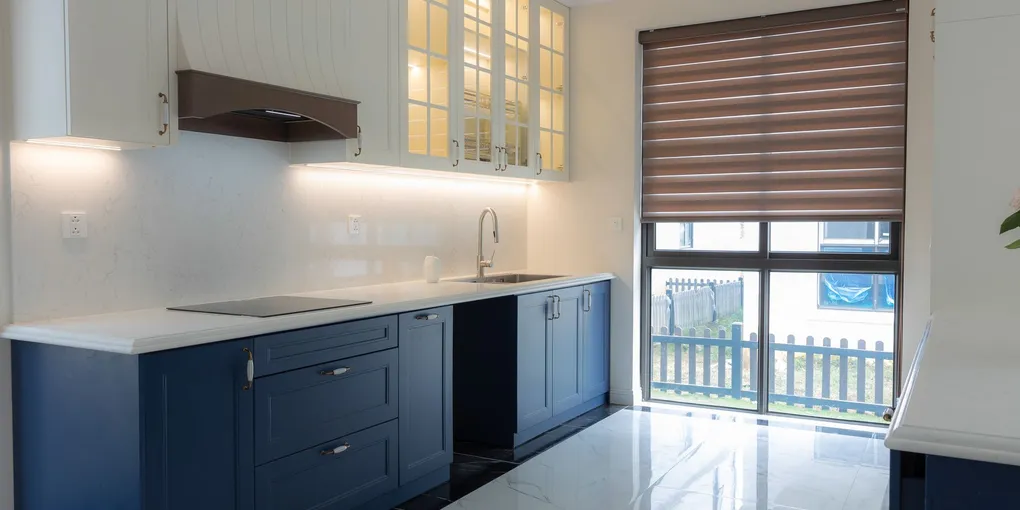
Install under-cabinet LED strip lights by adhering self-stick LED strips to the underside of your cabinets and plugging into a nearby outlet. The entire project takes 30–60 minutes and costs $20–$80 for plug-in LED strips. Hardwired options cost $200–$500 installed and offer a cleaner look with no visible cords.
Frequently Asked Questions
Are LED strip lights good for under cabinet lighting?
Yes. LED strips produce even, shadow-free light that's ideal for kitchen tasks. Choose strips rated 3000K–4000K (warm to neutral white) for the most flattering kitchen lighting. Strips with at least 300 lumens per foot provide good task lighting.
Do under-cabinet lights need to be hardwired?
No. Plug-in LED strips and battery-powered puck lights require no electrical work. Hardwired fixtures look cleaner (no visible cords) and can be controlled by a wall switch, but they require basic electrical skills or an electrician.
What color temperature is best for kitchen under-cabinet lights?
3000K (warm white) is the most popular for kitchens — it's warm but not yellow. 4000K (neutral white) works well for modern kitchens and provides slightly better visibility for food prep. Avoid 5000K+ (daylight) unless you specifically want a clinical look.
How much does it cost to hardwire under-cabinet lighting?
Hardwired LED under-cabinet lighting costs $200–$500 installed by an electrician, including materials. The cost depends on how many cabinets you're lighting, whether new wiring needs to be run, and the fixture style. DIY hardwired installation saves about 50%.
Can you dim under-cabinet LED lights?
Plug-in LED strips with built-in dimmers cost $30–$60 and offer touch or remote dimming. Hardwired fixtures can be connected to a standard dimmer switch (use an LED-compatible dimmer). Some smart LED strips support dimming via app or voice control.
Install under-cabinet LED strip lights by adhering self-stick LED strips to the underside of your cabinets and plugging into a nearby outlet. The entire project takes 30–60 minutes and costs $20–$80 for plug-in LED strips.
Under-cabinet lighting transforms a kitchen more than almost any other upgrade at its price point. It eliminates shadows on your countertops, makes food prep safer, and adds a warm ambiance that overhead lighting can’t match. The best part: plug-in LED strips take about 30 minutes to install with no electrical skills.
Types of Under-Cabinet Lighting
LED Strip Lights (Best for Most Kitchens)
Flexible adhesive strips that stick to the underside of cabinets. They produce continuous, even light without hot spots or gaps. Modern LED strip kits are thin enough (about 1/4 inch) to be invisible from normal viewing angles.
Cost: $20–$50 for 10–16 feet (enough for most kitchens) Pros: Even light distribution, easy to cut to length, very thin profile Cons: Adhesive can fail on greasy surfaces, visible if cabinets are above eye level
LED Puck Lights
Small disc-shaped puck lights (2–3 inches diameter) mounted individually. They create focused pools of light and work well for accent lighting or display cases. Available in plug-in, hardwired, and battery-powered versions.
Cost: $15–$40 for a set of 3–6 Pros: Easy to position, battery option means no wiring at all Cons: Creates uneven lighting with bright spots and shadows between pucks
LED Light Bars
Rigid LED light bars that mount under the cabinet with screws or adhesive. They’re essentially a more polished version of strip lights with a built-in housing that looks professional.
Cost: $30–$80 per bar (12–24 inches each) Pros: Clean, finished look; easy to link multiple bars together Cons: Fixed lengths may not match your cabinets exactly, more visible than strips
Hardwired Fixtures
Permanent fixtures connected to your home’s electrical system. They’re controlled by a wall switch (or dimmer) and have no visible cords. This is the premium option.
Cost: $200–$500 installed (fixtures + electrician) Pros: No visible cords, wall switch control, cleanest look Cons: Requires electrical work, most expensive option
Choosing the Right Color Temperature
Color temperature makes or breaks the look of under-cabinet lighting:
| Temperature | Look | Best For |
|---|---|---|
| 2700K | Warm, yellowish | Traditional kitchens, ambiance |
| 3000K | Warm white | Most kitchens (most popular) |
| 4000K | Neutral white | Modern kitchens, task lighting |
| 5000K+ | Cool daylight | Commercial, clinical |
Our recommendation: 3000K for kitchens with warm-toned cabinets (wood, cream) and 4000K for kitchens with cool-toned cabinets (gray, white, modern). If you can’t decide, buy a tunable strip that lets you adjust between warm and cool.
Brightness: How Many Lumens Do You Need?
For task lighting (cooking, chopping, reading recipes): 200–300 lumens per foot of counter space.
For accent/ambient lighting: 100–150 lumens per foot is sufficient.
Most LED strip kits list total lumens — divide by the strip length to get lumens per foot. A 16-foot strip rated at 3,200 lumens delivers 200 lumens per foot, which is good for task lighting.
Plug-In vs. Hardwired: How to Decide
| Factor | Plug-In | Hardwired |
|---|---|---|
| Installation time | 30–60 minutes | 2–4 hours |
| Cost | $20–$80 | $200–$500 |
| Electrical skill needed | None | Moderate (or hire electrician) |
| Visible cords | Yes (can be hidden) | No |
| Switch control | Remote/touch/plug | Wall switch or dimmer |
| Renter-friendly | Yes | No |
Choose plug-in if: You’re renting, want a quick upgrade, or have outlets near your cabinets.
Choose hardwired if: You’re renovating, want a clean permanent look, or want to control lights from a wall switch.
Pro Tips for the Best Results
Mount lights at the front edge. Placing strips toward the front of the cabinet (closest to you) lights the countertop evenly and hides the strip from view. Mounting at the back creates a bright line at the wall and shadows on your work surface.
Add a diffuser channel. For $10–$20, aluminum channels with frosted diffuser covers eliminate the dotted appearance of individual LEDs and spread light more evenly. This makes a huge difference in perceived quality.
Use warm dim for entertaining. Some smart LED strips can “warm dim” — they shift from neutral white at full brightness to warm amber when dimmed, mimicking how incandescent bulbs behave. This is great for kitchens open to living/dining areas.
Consider motion sensors. Battery-powered puck lights with motion sensors ($15–$30) work great for pantries, closets, and display cabinets. The light turns on when you open the door and off when you walk away.
Don’t forget inside the cabinets. LED strips inside glass-front cabinets create a beautiful display effect. Use warm white (2700K–3000K) at lower brightness for a soft glow that highlights dishware or glassware.
If you want a wall-switch-controlled dimmer for a hardwired install, see our dimmer switch installation guide for the wiring steps. Under-cabinet LEDs pair well with a cabinet refresh — check out how to paint kitchen cabinets before or after the lighting upgrade.
Related Reading
- How to Install a Dimmer Switch — add wall-switch dimming for hardwired under-cabinet fixtures
- How to Paint Kitchen Cabinets — pair new lighting with refreshed cabinets
- How to Replace a Light Switch — foundational wiring skills if you’re going hardwired
- How to Add an Electrical Outlet — add a dedicated outlet for plug-in under-cabinet lights
- New Homeowner Toolkit — the basic tools you’ll need for this project
- How to Install a Ceiling Fan with No Existing Wiring — run new wiring to a room where there’s no existing ceiling circuit
- Measure and plan your layout
Measure the underside of each cabinet you want to light. For even coverage, place lights toward the front edge of the cabinet (closest to you), which prevents the countertop backsplash from casting shadows. Note where the nearest electrical outlet is — you'll run the power cord to it.
- Choose your light type
LED strip lights ($20–$50) offer the most even illumination and are easiest to install. Puck lights ($15–$40 for a set) create pools of focused light and work well for accent lighting. Light bars ($30–$80) are a middle ground with a clean, professional look. For most kitchens, LED strips are the best value.
- Clean the mounting surface
Wipe the underside of each cabinet with rubbing alcohol to remove grease and dust. The adhesive on LED strips and puck lights needs a clean, dry surface to stick permanently. Skip this step and your lights will peel off within weeks.
- Install the LED strips
Peel the adhesive backing and press the LED strip firmly along the front edge of the cabinet underside. For corners and turns between cabinets, use the strip's cut points (marked every 2–3 inches) and connect sections with solderless strip connectors. Use cable clips to secure the wire run between cabinets.
- Hide the wiring
Run the power cord along the back of the cabinet, securing it with adhesive cable clips every 6–8 inches. Where the cord transitions from cabinet to wall, use a cord channel (paintable plastic channel) to keep it tidy. Route the cord behind the cabinet to the nearest outlet.
- Connect power and test
Plug in the power adapter and test all strips. Check for dark spots, uneven brightness, or flickering. If using a dimmer, test the full range. Adjust any strips that have peeled or shifted. For hardwired installations, turn off the breaker, connect wires to the junction box, and test.
Free: 10-Point Home Maintenance Checklist
Prevent costly repairs with this seasonal checklist. Save hundreds every year by catching problems early.
Your checklist is ready!
Open Checklist →Something went wrong. View the checklist here.