How to Fix a Gas Stove Igniter That Keeps Clicking (2026)
A gas stove igniter that clicks constantly — even when burners are off — usually has a wet or dirty igniter cap. This guide covers cleaning the burner cap and electrode, and replacing an igniter switch when cleaning doesn't stop the clicking.
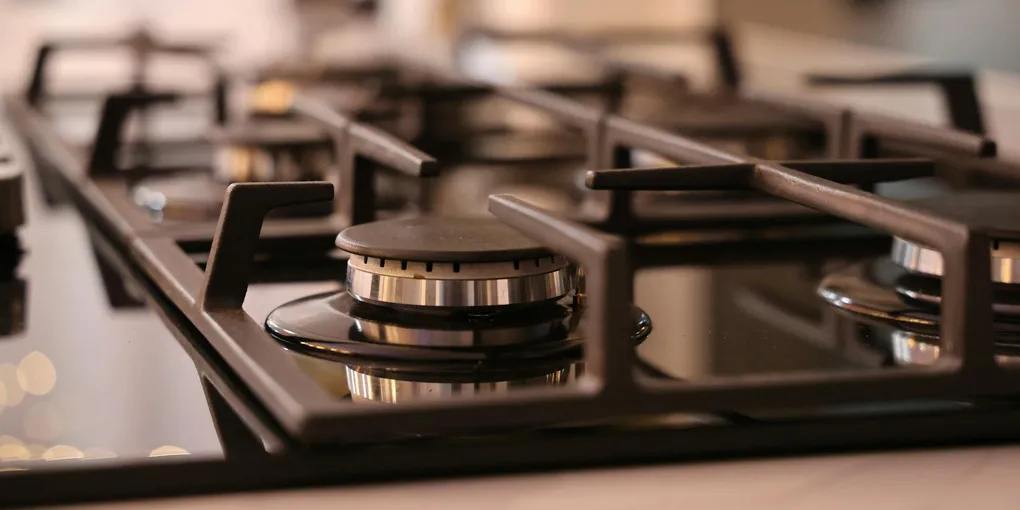
Gas stove clicking non-stop: the igniter electrode near the burner is wet or has food debris causing a short circuit. Remove the burner grates and the burner cap (the ceramic disc on top of the burner). Clean the electrode tip (the small white ceramic post near the burner) with a dry cotton swab or a toothbrush. Dry the burner cap thoroughly — if you've recently cleaned the stove with water, set the caps aside to air dry for 30–60 minutes before reassembling.
Frequently Asked Questions
Why does a gas stove igniter click on its own?
The igniter system generates a spark to light the burner. When moisture or food debris bridges across the igniter electrode to a grounded surface (the burner cap, the cooktop surround), it creates a partial electrical path that causes the spark module to fire continuously. This is almost always a moisture or contamination issue. A constantly-clicking igniter that stops when you press on the burner grate or cap suggests a loose ground connection — check that the burner cap is seated flat.
The igniter clicks but the burner won't light. What's wrong?
Clicking but no ignition: (1) The electrode tip is dirty or corroded — clean with a dry toothbrush or fine sandpaper. (2) The burner ports are clogged — food debris in the small holes around the burner ring prevents gas from flowing to the ignition point. Clean the burner ports with a pin or toothpick. (3) The gas supply isn't reaching the burner — check that the burner cap is seated correctly (misaligned caps prevent gas from reaching the electrode). (4) On electronic ignition: the spark gap is too large from corrosion — the electrode tip should be 1/8 to 3/16 inch from the burner cap.
How do I clean the igniter electrode?
Remove the grate and the burner cap. Find the igniter: it's the small white ceramic post near each burner, roughly 1/4 inch tall. Dry it with a cotton swab. If there's burnt food on the ceramic: gently scrub with a dry toothbrush or cotton swab lightly moistened with rubbing alcohol. Do not use water around the igniter — water causes the very problem you're trying to fix. Never use any metallic object to scrub the electrode tip — you can damage the ceramic insulator.
I cleaned everything and the clicking continues. What else could it be?
If cleaning doesn't stop the clicking: the igniter switch (the switch in the cooktop that's activated by pressing the burner knob) has a short or has worn contacts that stay partially closed. Test: with the burner in the OFF position, if the clicking stops when you press and hold the burner knob (activating the switch), the switch has a sticky contact. The fix is replacing the igniter switch for that burner ($15–$30 — model-specific). Also check that the electrical ground connection to the cooktop is secure — a poor ground can cause intermittent clicking.
Can I use my stove while the igniter is clicking?
Yes — continuous clicking is annoying but safe to use (the stove will light normally). You can light the burner manually with a long lighter as a temporary workaround: hold the lighter at the burner while turning the knob to release gas. However, leave the clicking state unresolved long-term — continuous electrical cycling can wear out the spark module faster, and in some models the clicking indicates moisture that could indicate a more serious spill or cleaning issue.
How much does it cost to fix a gas stove igniter?
If cleaning fixes it: $0. Replacing an igniter switch (the most common part failure after cleaning): $15–$30 for the part, 30 minutes of labor, and available model-specific on Amazon or Repair Clinic. Replacing the spark module (the control board powering all igniters): $40–$80 for the part. Professional stove repair service call for an igniter issue: $100–$200 including labor. Most igniter repairs are DIY-friendly — budget $0–$30 to handle it yourself.
Which stove brands have the most igniter clicking problems?
Igniter clicking is common across all gas range brands since the mechanism is nearly identical everywhere. Samsung gas ranges have a known moisture issue — the manufacturer recommends using a hair dryer on low heat to dry the igniter well after cleaning. GE, Whirlpool, and LG igniters typically last 8–12 years before switch wear causes persistent clicking. For any brand, the fix is the same: clean the electrode first, then replace the igniter switch for that burner if cleaning fails.
A gas stove igniter that keeps clicking is almost always caused by moisture or food debris on the electrode — the small white ceramic post next to the burner. Remove the burner cap, dry the electrode with a cotton swab, and let the cap air-dry 30–60 minutes. That fixes 90% of cases at zero cost. If cleaning fails, the igniter switch for that burner is faulty and costs $15–$30 to replace.
Non-stop clicking is almost always moisture or debris — a 15-minute cleaning fix.
What you need
- Cotton swabs
- Dry toothbrush
- Rubbing alcohol (optional, for stubborn deposits)
- Replacement igniter switch (if cleaning doesn’t fix it)
Step 1: Identify the affected burner
Which burner is clicking? The clicking comes from the igniter closest to the burner that was wet or dirty.
Step 2: Remove the grate and burner cap
Lift off the grate over the affected burner. Lift off the burner cap (the ceramic disc sitting on top of the burner head). Check underneath and inside the burner head for standing water or food debris.
Step 3: Dry and clean the igniter electrode
Find the igniter: the small ceramic post near the burner. Dry it thoroughly with a cotton swab. If food debris is baked onto the ceramic: gently scrub with a dry toothbrush.
Also dry the burner cap itself and the burner head with a clean cloth.
Step 4: Allow to dry and reassemble
If the stove was recently cleaned with water: let all components air dry for at least 30–60 minutes before reassembling. Set the burner caps upside down on a clean surface.
Reassemble: seat the burner cap flat and centered on the burner head, then replace the grate. Confirm the cap is seated — a misaligned cap causes both ignition failure and clicking.
Step 5: Test
Power the range back on. If it still clicks with no burner knob turned: one more round of cleaning, or proceed to switch replacement.
Related guides
- How to Clean an Oven — deep oven cleaning that may contribute to burner debris
- Annual Home Maintenance Schedule — stove maintenance timing
- Identify the clicking burner
Press each burner knob one at a time — the clicking usually stops momentarily when you press the knob of the affected burner. If clicking is on all burners simultaneously, moisture may have gotten into the spark module or cooktop. The most common cause of all-burner clicking is a recent spill cleanup that left moisture on the igniter electrodes.
- Remove grate and burner cap
Lift off the cast iron grate from the affected burner. Lift off the burner cap (the ceramic disc sitting on top of the burner base). Do not pry — it lifts straight up. Set it aside on a dry surface. Note: some burner caps have a small notch that must align with a post on the burner — check that it seats flat when reassembling.
- Dry and clean the igniter electrode
Find the igniter: it's a small white ceramic post (about 1/4 inch tall) beside the burner opening. Clean it with a dry cotton swab or an old toothbrush. For food buildup, lightly moisten a cotton swab with rubbing alcohol (not water) and scrub gently. Dry the burner cap with a paper towel; if recently washed, let it air dry for 30-60 minutes or use a hair dryer on low.
- Check for debris in burner ports
While the cap is off, inspect the small holes (ports) around the burner ring. Food debris in these holes prevents gas from reaching the ignition point. Clear them with a toothpick, pin, or straightened paper clip. Do not use a wooden toothpick that could snap off inside the port.
- Reassemble and test
Seat the burner cap flat (align the notch if present). Replace the grate. Test: the clicking should stop within 30 seconds. If clicking continues after fully drying, the igniter switch has a shorted contact and needs replacement ($15-30, model-specific on Repair Clinic or Amazon). Replace only the switch for the affected burner — not the entire module.
Free: 10-Point Home Maintenance Checklist
Prevent costly repairs with this seasonal checklist. Save hundreds every year by catching problems early.
Your checklist is ready!
Open Checklist →Something went wrong. View the checklist here.